Step 1
Question raised
The submitter records the construction question, drawing and page references, affected area, and supporting attachments.
Connect construction questions to drawing references, related Submittals, reviewer comments, and supporting files. Keep response drafts subject to human review before the final answer is sent.
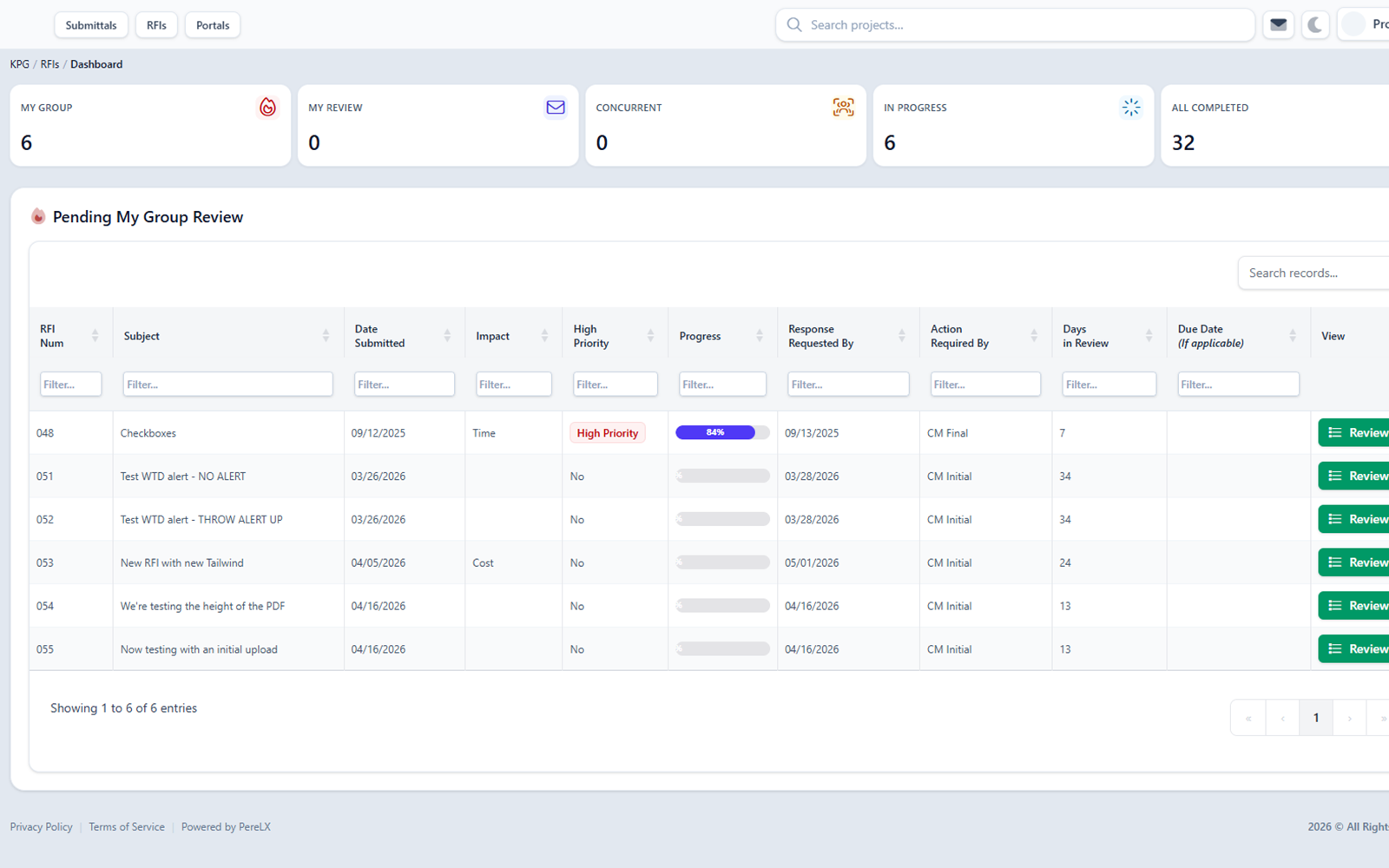
What ConstructFlow controls and preserves on RFIs.
RFI response workflow
Follow the four steps from a documented question to a human-approved answer. The facilitator manages routing; the responsible reviewer checks the evidence and approves the response.
The submitter records the construction question, drawing and page references, affected area, and supporting attachments.
The facilitator routes the question to the responsible reviewer and keeps ownership and the next review step visible.
The reviewer checks the referenced drawings, related Submittals, and comments, then prepares a draft answer for approval.
The responsible reviewer approves the response before it is sent; the final answer and supporting history stay with the RFI.
See how this fits the shared review flow foundation used across RFIs and Submittals.
Design clarifications
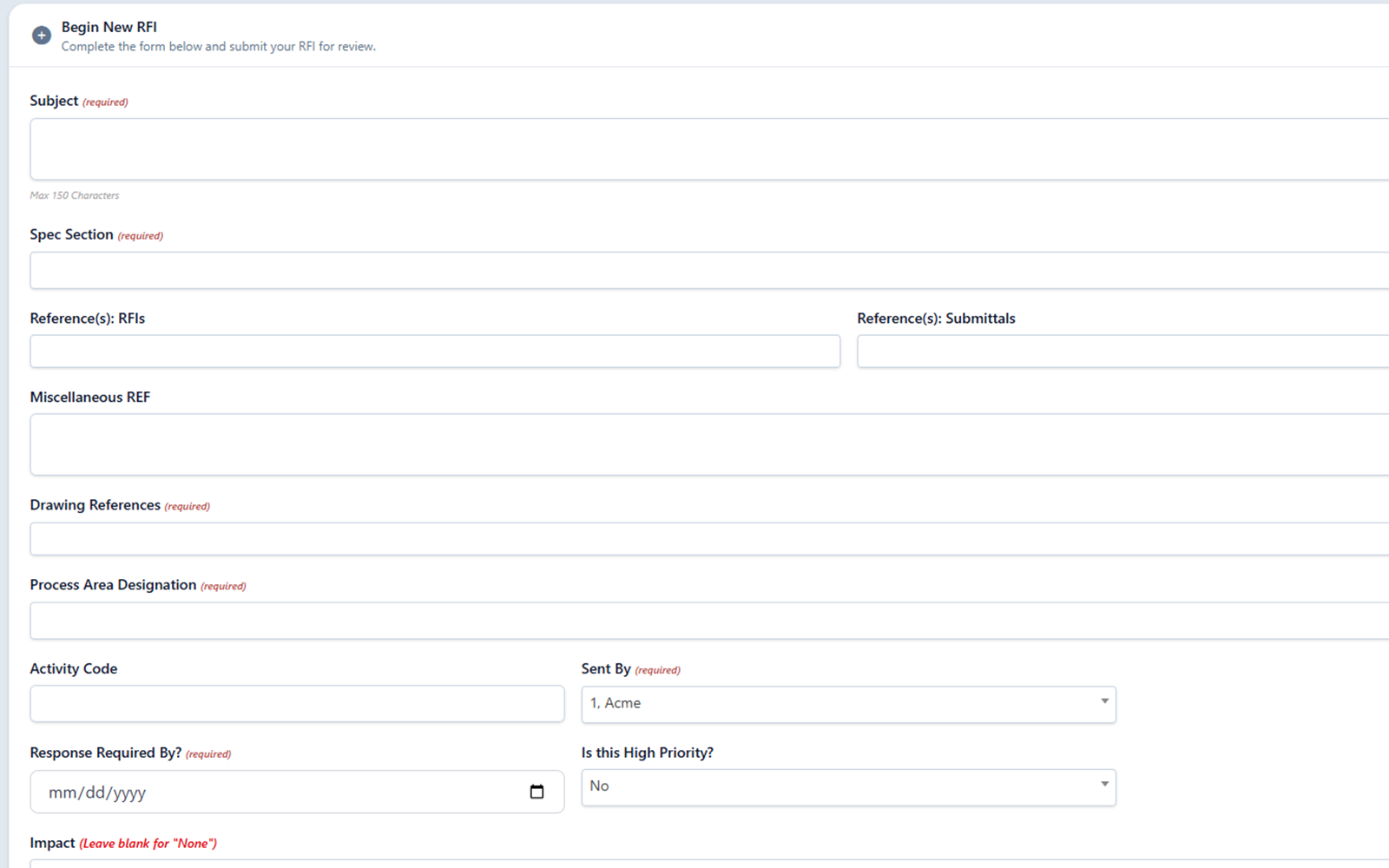
RFIs keep drawing/page references, area/design tags, required reference fields, attachments, related Submittals, and prior decisions available while reviewers answer.
Required reference fields
Capture the required references reviewers need before they can evaluate the question.
Drawing reference
Link the specific drawing and page reference so reviewers can open the source directly.
Related Submittal
Connect the RFI to the Submittal cycle that prompted it so the prior decisions stay in view. See how shared review flow works across both modules.
Area/design tags
Tag the affected area or design context so the approved answer lands in the right part of the project record.
Source evidence
This hypothetical door-hardware clarification shows how a submitter, facilitator, and architect use drawing references and human review to reach a recorded answer.
Hypothetical construction RFI example
Draft response for architect review
Use the hardware set identified in the door schedule on drawing A-601 for Door D-104. Revise the related Door Hardware Submittal to reference that set and return it for review. This draft does not approve a product substitution.
Submitter: RFI-017
The Door Hardware Submittal references a different hardware set for Door D-104 than drawing A-601. Which reference should the revised Submittal use?
A-601 door schedule; A-101 floor plan
In this fictional example, A-601 identifies the hardware set and A-101 locates Door D-104. The architect checks both before answering.
Facilitator routes; architect reviews
The facilitator assigns the clarification to the architect. The architect checks the drawings and related Submittal, then approves the response for sending.
Illustrative approved response: After checking A-601 and A-101, the architect approves the instruction to reference the scheduled hardware set and return the revised Submittal for review. The RFI retains the question, references, response, and review history. All identifiers and events here are fictional; this is not a customer record or a direction to perform construction work.
See shared project record intelligence for the cross-module source-linked workflow view.
Draft response language
ConstructFlow can help assemble response language from reviewer comments, required references, drawing/page evidence, related Submittals, and attachments. Reviewers approve what goes out.
Reviewer comments
Drafts can pull from the existing reviewer comment thread so the response language reflects what was already discussed.
Drawing and page references
Drawing/page references and prior decisions are available as source material when drafts are assembled.
Related Submittals
Related Submittal cycles stay in view so the draft can reference the package decisions that informed the question.
Attachments
Linked attachments and page references travel with the draft so reviewers can verify the source before approving.
What reviewers approve
See record-backed AI for review work across Submittals and RFIs.
Status history
Track the RFI as it moves through submission, routing, and answered status so the response history remains tied to the project record.
Question submitted
The clarification enters the project record with context.
Reviewer routed
The responsible reviewer sees related files and prior decisions, with the next step kept visible.
Answer drafted
Response language is prepared for human review.
Response approved
Final language and status history stay available for closeout.
Status history
Each transition stays attached to the RFI so the record shows the submitted question, required references, reviewer, draft response, and approved final answer.
See shared routing and status movement for both workflow types.
A clarification request is captured against the project record with attachments and context.
The responsible reviewer is brought into the thread with related files and prior decisions in view.
Final response language stays tied to the RFI alongside its status history and supporting files.
Exports and closeout
Keep final response language, drawing/page references, related Submittals, and closeout material connected when the project record is exported.
Preserve the final answer and its supporting thread so the response remains legible to anyone receiving it.
Show when a clarification depends on Submittal context so the relationship survives in the project record.
Carry response history, related files, and status decisions into closeout alongside the rest of the cycle record.
See shared exports and closeout support for RFIs and Submittals.
Estimate the coordination value of your RFI and Submittal review volume with the construction Submittal and RFI ROI calculator.
RFI FAQ
Straight answers for teams evaluating design clarification workflows, draft language, and source evidence.
It covers design clarification workflows that connect reviewers, reminders, attachments, related Submittals, source material, and final response language.
Yes. RFIs can bring drawing/page references, area/design tags, required reference fields, related files, prior decisions, and related Submittals into the review workflow.
Yes, as human-approved draft language. Drafts can use required references, drawing/page evidence, reviewer comments, related Submittals, and attachments.
No. AI-supported language stays in draft form until a reviewer approves it for sending.
The workflow can preserve status history, drawing/page references, area/design context, final response language, exports, and the relationship between RFIs and Submittals.
Ready for a closer look
Walk through question intake, source evidence, draft language, review approval, and exports.