Step 1
Question raised
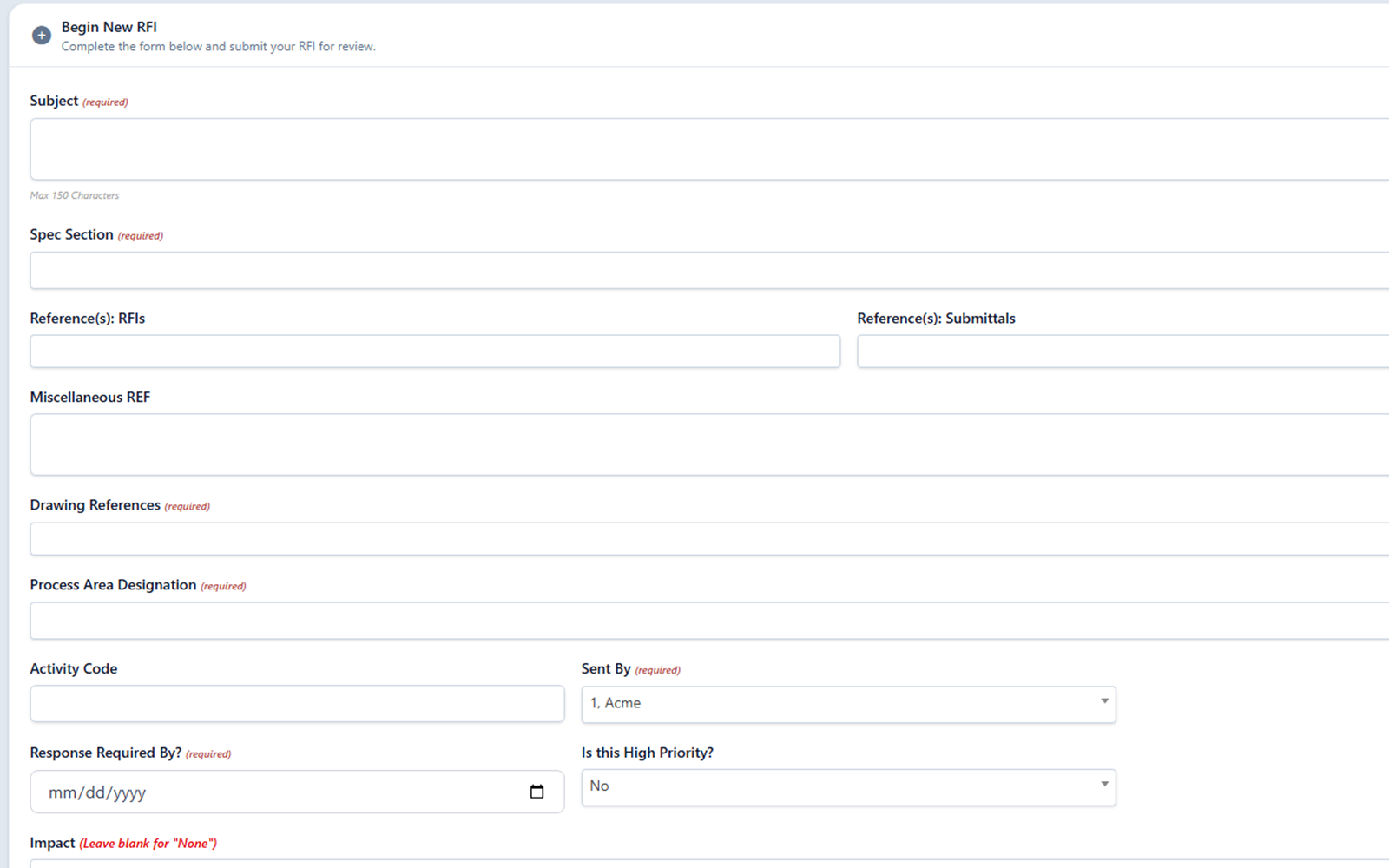
Capture the clarification request with required drawing/page references, area/design tags, attachments, and project context.
Automatically pull in drawings, tags, and submittal history so every RFI response is accurate, verified, and backed by the specs.
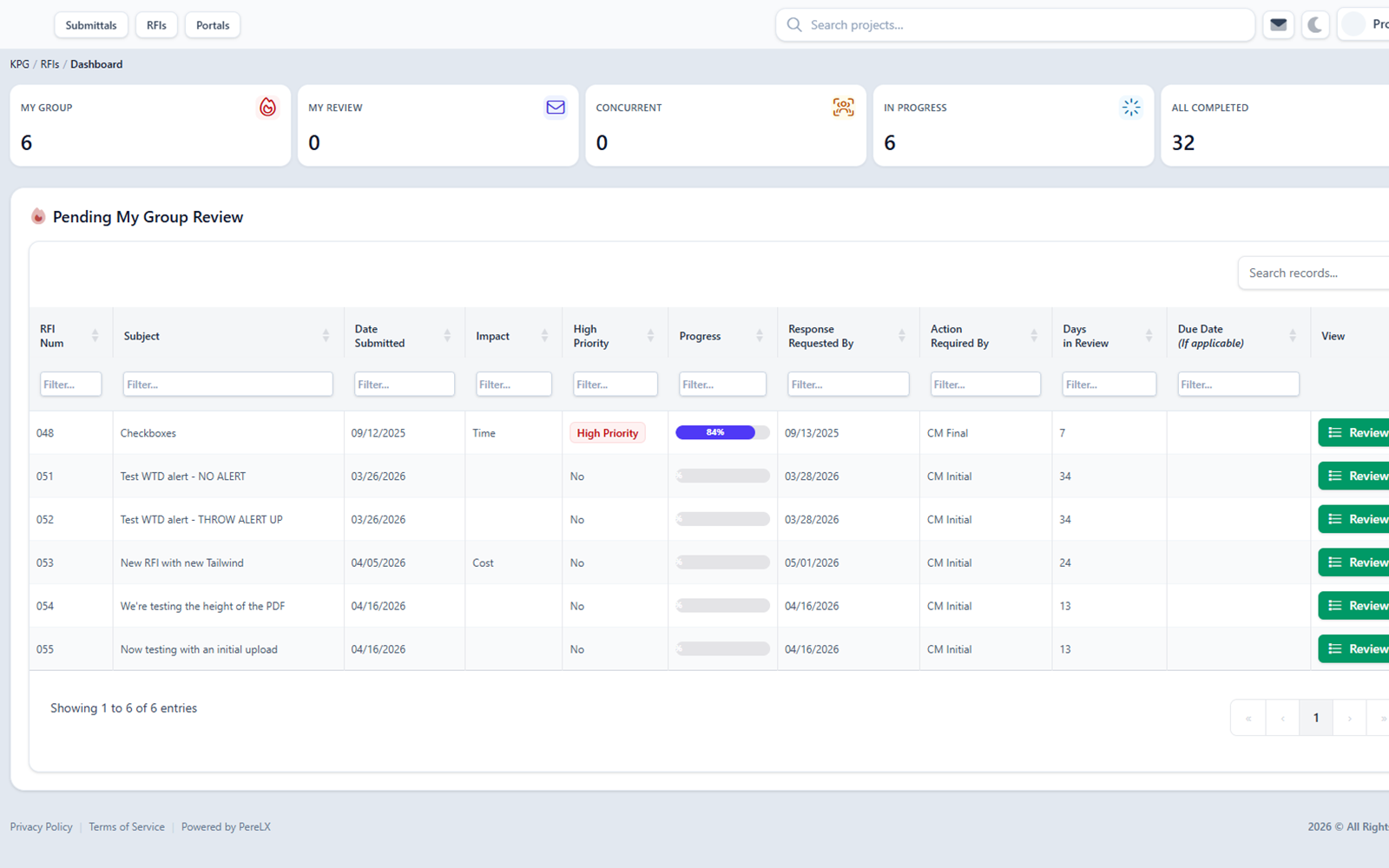
What ConstructFlow controls and preserves on RFIs.
RFI response workflow
Move from question intake to reviewer-approved response while keeping reminders, supporting files, and related decisions visible.
Capture the clarification request with required drawing/page references, area/design tags, attachments, and project context.
Bring the right reviewer into the thread and keep the next step visible before response language is finalized.
Prepare response language from linked references, reviewer comments, files, and prior decisions for human approval.
Send final language only after human review and approval.
See how this fits the shared review flow foundation used across RFIs and Submittals.
Design clarifications
RFIs keep drawing/page references, area/design tags, required reference fields, attachments, related Submittals, and prior decisions available while reviewers answer.
Required reference fields
Capture the required references reviewers need before they can evaluate the question.
Drawing reference
Link the specific drawing and page reference so reviewers can open the source directly.
Related Submittal
Connect the RFI to the Submittal cycle that prompted it so the prior decisions stay in view. See how shared review flow works across both modules.
Area/design tags
Tag the affected area or design context so the approved answer lands in the right part of the project record.
Source evidence
AI-assisted drafts can reference RFIs, drawing/page references, area/design tags, Submittals, and PDF page evidence so reviewers can verify the source before responding.
Draft answer with source references
Draft answer for review
The project record shows that the door hardware substitution still needs architect review. The latest RFI response references the approved finish schedule, and the Submittal comments request a revised cut sheet before final approval.
RFI-017 Final Response
Reviewer response references finish schedule and requires confirmation before release.
Door Hardware Submittal Cycle 2
Open comment requests a revised cut sheet and updated manufacturer data.
Finish Schedule page reference
Indexed page evidence points reviewers to the relevant schedule location when available.
See shared project record intelligence for the cross-module source-linked workflow view.
Draft response language
ConstructFlow can help assemble response language from reviewer comments, required references, drawing/page evidence, related Submittals, and attachments. Reviewers approve what goes out.
Reviewer comments
Drafts can pull from the existing reviewer comment thread so the response language reflects what was already discussed.
Drawing and page references
Drawing/page references and prior decisions are available as source material when drafts are assembled.
Related Submittals
Related Submittal cycles stay in view so the draft can reference the package decisions that informed the question.
Attachments
Linked attachments and page references travel with the draft so reviewers can verify the source before approving.
What reviewers approve
See record-backed AI for review work across Submittals and RFIs.
Status history
Track the RFI as it moves through submission, routing, and answered status so the response history remains tied to the project record.
Question submitted
The clarification enters the project record with context.
Reviewer routed
The responsible reviewer sees related files and prior decisions, with the next step kept visible.
Answer drafted
Response language is prepared for human review.
Response approved
Final language and status history stay available for closeout.
Status history
Each transition stays attached to the RFI so the record shows the submitted question, required references, reviewer, draft response, and approved final answer.
See shared routing and status movement for both workflow types.
A clarification request is captured against the project record with attachments and context.
The responsible reviewer is brought into the thread with related files and prior decisions in view.
Final response language stays tied to the RFI alongside its status history and supporting files.
Exports and closeout
Keep final response language, drawing/page references, related Submittals, and closeout material connected when the project record is exported.
Preserve the final answer and its supporting thread so the response remains legible to anyone receiving it.
Show when a clarification depends on Submittal context so the relationship survives in the project record.
Carry response history, related files, and status decisions into closeout alongside the rest of the cycle record.
See shared exports and closeout support for RFIs and Submittals.
RFI FAQ
Straight answers for teams evaluating design clarification workflows, draft language, and source evidence.
It covers design clarification workflows that connect reviewers, reminders, attachments, related Submittals, source material, and final response language.
Yes. RFIs can bring drawing/page references, area/design tags, required reference fields, related files, prior decisions, and related Submittals into the review workflow.
Yes, as human-approved draft language. Drafts can use required references, drawing/page evidence, reviewer comments, related Submittals, and attachments.
No. AI-supported language stays in draft form until a reviewer approves it for sending.
The workflow can preserve status history, drawing/page references, area/design context, final response language, exports, and the relationship between RFIs and Submittals.
Ready for a closer look
Walk through question intake, source evidence, draft language, review approval, and exports.