Step 1
Submit package
Upload the Submittal package with attachments and project context.
Route packages to internal and external reviewers, capture comments, align Recommend Codes with final status, and keep every auto-generated re-submittal cycle tied to the same project record.
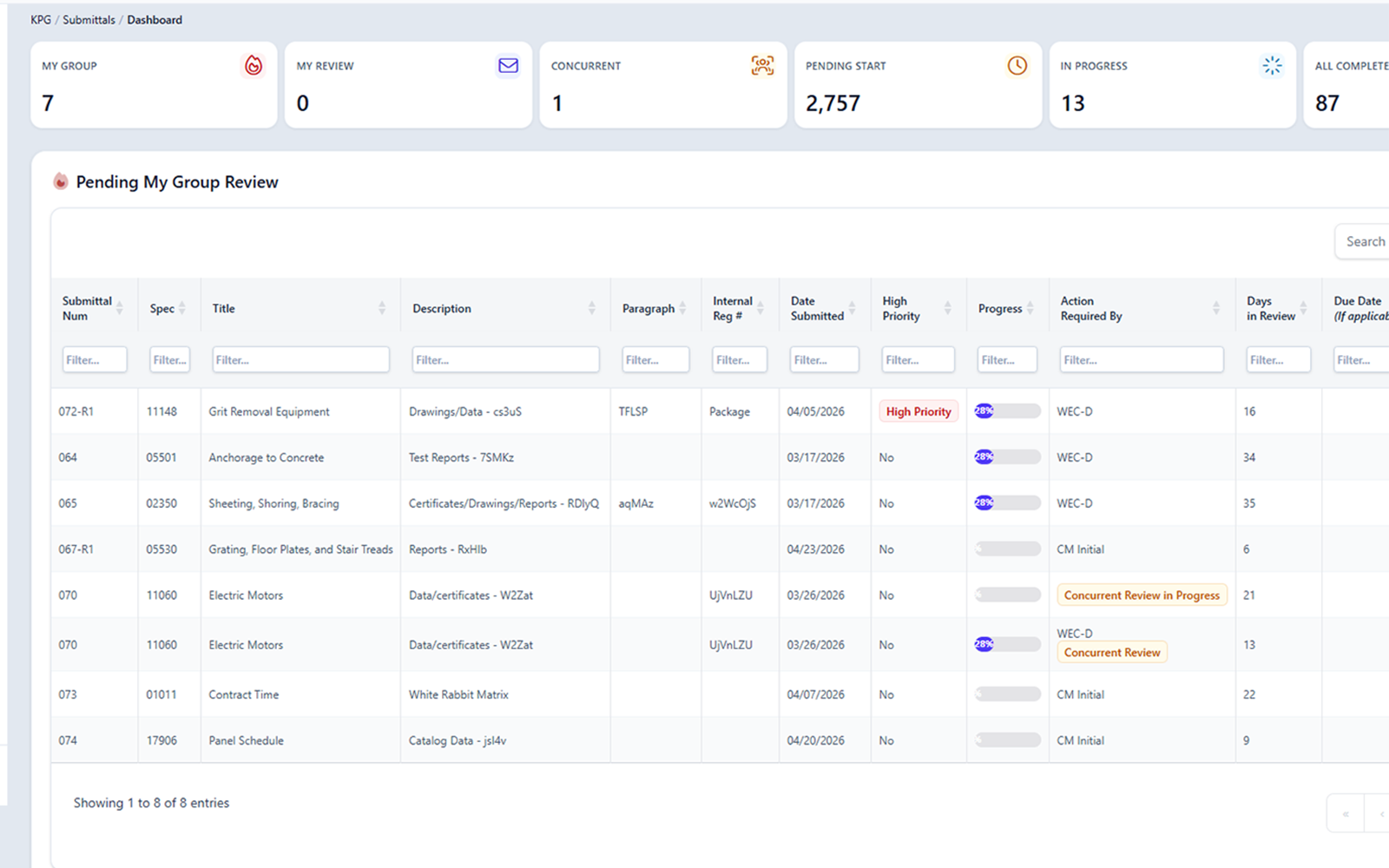
What ConstructFlow controls and preserves on Submittals.
Submittal review workflow
Keep the package, reviewers, status decisions, and next cycle visible from first submission through closeout.
Upload the Submittal package with attachments and project context.
Send the package through the internal group, external reviewer, or both.
Capture reviewer comments with recommendation codes that support the final package status.
When revisions are needed, preserve the returned cycle and start the next submission with prior context intact.
Routing internal and external review
Separate internal review, external review, and final status decisions so the record shows who had the package and what changed.
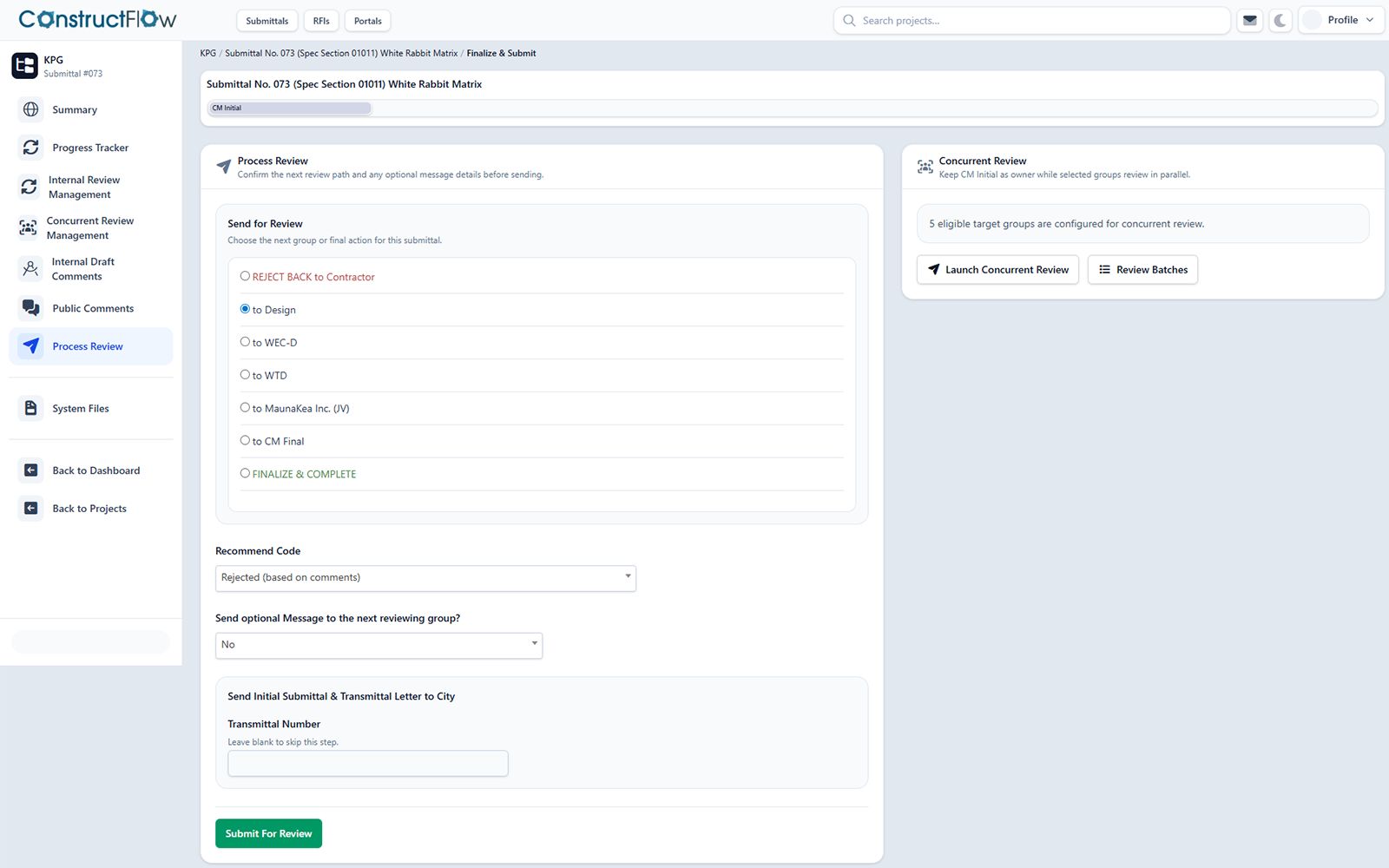
Coordinate project team comments before the package moves forward.
Send the package to outside reviewers while preserving the same review thread.
Record the final decision with the comments and attachments that informed it.
See how this fits the shared review flow foundation used across Submittals and RFIs.
Alerts and reminders
Use status alerts, reminders, and comment notifications to keep review movement visible.
Notify the team when review state changes or a package is returned.
Keep due reviews visible to the people responsible for the next step.
Bring reviewers back to the exact package context that needs attention.
See shared alerts and reminders for the cross-module workflow view.
Document creation
Turn routing, comments, decisions, attachments, and version history into a final PDF package or coversheet for project records.
Final PDF package
Compile the cycle's package and final status into one PDF that matches the decisions made.
Coversheet summary
Summarize routing, status, and reviewers on a coversheet that travels with the package.
Comment history
Carry the comment trail with the deliverable so the rationale stays with the record.
Version record
Document versions stay tied to the cycle so prior submissions remain part of the record.
For evidence-based response drafting, see the shared project record intelligence workflow.
Automatic re-submittals
When a Submittal is returned, ConstructFlow can preserve the previous comments, Recommend Codes, status decisions, and document versions while starting the next cycle with context.
Cycle 1 submitted
Package enters review with attachments and routing.
Comments returned
Reviewers identify changes and status direction.
Next cycle generated
The revised package is tracked as the next cycle with prior context intact.
Approved record
The final decision remains tied to the cycle history.
Cycle preservation
When a Submittal returns for changes, the prior cycle's comments, Recommend Codes, status decisions, and document versions remain part of the record so the next cycle starts with the full history in view.
Exports and closeout
Package the Submittal record into final PDFs, coversheets, and closeout exports with comments and decisions kept together.
Final review PDFs are generated against the cycle's record so the deliverable matches the decisions made.
Coversheets summarize routing, comments, and final status, so the package is legible to anyone receiving it.
Exports are built for handover at closeout. The comment trail, status decisions, and final files travel together.
For shared exports and closeout behavior across Submittals and RFIs, see shared exports and closeout support.
Submittals FAQ
Straight answers for teams evaluating how Submittals are routed, reviewed, and preserved.
It covers routing Submittal packages through review groups, capturing comments, aligning Recommend Codes with final status, and preserving auto-generated re-submittal history.
Yes. Attachments, comments, approvals, status changes, and re-submittal history can stay connected to the package record.
The workflow can support final PDF packages, coversheets, comment histories, version records, and closeout exports.
Returned Submittals can start a new generated cycle while prior comments, Recommend Codes, status decisions, and document versions remain part of the record.
No. AI-supported language is for reviewer drafting only. A reviewer must approve decisions before the workflow moves forward.
Ready for a closer look
Review routing, comments, final documents, and re-submittal history in one walkthrough.
Recommend Codes and status integrity
Keep comments, Recommend Codes, and final status aligned.
Submittal decisions stay easier to defend when reviewer comments, recommendation codes, approvals, files, and final package status remain attached to the same cycle.
Comment thread
The full discussion stays with the package so reviewer direction remains visible beside the final status.
Reviewer mentions
Bring the right reviewer back to the exact package context that needs attention.
Recommend Codes
Recommendation codes make reviewer direction easier to compare against the final package status.
Return for changes
When a package is returned, comment direction and status context move with it into the next generated cycle.
How status decisions stay aligned
For cross-module comments, mentions, and handoffs, see shared comments and collaboration controls.